日前在了解终端式浏览器的时候,无意中知道有TerminalImageViewer这个工具,其可以在命令行的环境下浏览图片。
紧跟着在当时就决定编译试试效果的,可惜的是在 Centos 7 系统下因为C++版本问题未能编译成功!
时隔多日看着还未关闭的标签页,想着现在手头边恰好有一个可供编译用的 Debian 12 系统的 VPS ,想到如此于是乎就决定再次尝试以下试试能不能成功编译出来。
Terminal Image Viewer (tiv)
一个小型C++程序,用于在(现代)终端中使用RGB ANSI代码和Unicode块图形字符显示图像。
有各种类似的工具(例如timg使用unicode半块字符在每个字符单元中显示两个24位像素。该程序通过将4×8像素单元映射到不同的unicode字符来增强分辨率,使用以下算法对每个4×8象素单元(可能被缩放)进行映射:
- 求当前单元格值范围最大的颜色通道(R、G或B)
- 在中间分割这个范围,并为单元格创建一个相应的位图
- 将位图与各种unicode块图形字符的假设位图进行比较
- 重新计算所选角色的前景和背景颜色。
通过使用禁用此优化来查看差异。-0选项。或者只需看看本文末尾的对比图片。
编译进行时
环境准备
目前仅支持g++可以使用任何您最喜欢的支持 C++17 和 Unix 标头的编译器,直接编译会出现下列错误:
root@ChiuYut-VM:~/TerminalImageViewer/src# make
g++ -O2 -std=c++17 -Wall -fexceptions   -c -o tiv.o tiv.cpp
make: g++: No such file or directory
make: *** [<builtin>: tiv.o] Error 127
我的环境没有g++因此需要安装对应的编译环境:
apt install build-essential
注:有对应编译环境的可以跳过此步骤。
下载TerminalImageViewer并编译
git clone https://github.com/stefanhaustein/TerminalImageViewer.git
cd TerminalImageViewer/src
make

# 执行将 tiv 二进制文件移动到 PATH
make install
在基于 Debian 的系统上通过以下方式安装ImageMagick
apt install imagemagick
遇到的错误如下
fatal error: png.h: No such file or directory在编译时出现的错误日志:
root@ChiuYut-VM:~/TerminalImageViewer/src# make
g++ -O2 -std=c++17 -Wall -fexceptions   -c -o tiv.o tiv.cpp
In file included from tiv.cpp:48:
CImg.h:488:10: fatal error: png.h: No such file or directory
  488 | #include "png.h"
      |          ^~~~~~~
compilation terminated.
make: *** [<builtin>: tiv.o] Error 1
解决:
apt install libpng-dev
In function 'cimg_library::CImg& cimg_library::CImg ::load_medcon_external(const char*) [with T = unsigned char]': 在编译时出现的警告日志:
root@ChiuYut-VM:~/TerminalImageViewer/src# make
g++ -O2 -std=c++17 -Wall -fexceptions   -c -o tiv.o tiv.cpp
In file included from tiv.cpp:48:
CImg.h: In function 'cimg_library::CImg<T>& cimg_library::CImg<T>::load_medcon_external(const char*) [with T = unsigned char]':
CImg.h:59962:45: warning: '%s' directive argument is null [-Wformat-truncation=]
59962 |       cimg_snprintf(command,command._width,"%s.hdr",body._data);
      |                                             ^~
g++ -O2 -std=c++17 -Wall -fexceptions   -c -o tiv_lib.o tiv_lib.cpp
g++ -pthread tiv.o tiv_lib.o -o tiv  -lpng
此乃警告信息,一开始还以为会影响到编译成果,后来发现依旧能编译出需要的二进制可执行文件
tiv。打算升级
CImg.h解决:wget https://github.com/dtschump/CImg/raw/master/CImg.h -O /path/to/TerminalImageViewer/src/CImg.h
可惜依旧是会出现这个警告问题……
CImg::load(): Failed to recognize format of file 在使用的时候遇到的错误日志:
root@ChiuYut-VM:~/TerminalImageViewer/src# ./tiv /root/32634.jpg

[CImg] *** CImgIOException *** [instance(0,0,0,0,(nil),non-shared)] CImg<uint8>::load(): Failed to recognize format of file '/root/32634.jpg'.
Error: '/root/32634.jpg' has an unrecognized file format
解决:
apt install imagemagick
差点忘记需要安装这个支持才能正常使用了。
使用
tiv [options] <filename> [<filename>...]
该 shell 将扩展通配符。默认情况下,如果提供多个图像,将显示缩略图和文件名。要查看选项列表,可以在不带任何参数的情况下运行该命令,也可以使用--help。
常见问题/故障排除
- 出现“无法识别文件格式”等错误?请确保已安装ImageMagic。
- 在某些linux平台上,似乎需要一个额外的标志:
make LDLIBS=-lstdc++fs(但它也破坏了MacOs) - 如果您看到奇怪的水平线,说明字符没有完全填满字符单元格。请在终端应用程序中移除额外的线间距。
- 错误的颜色?尝试用-256来使用256色调色板,而不是24位颜色
- 出现奇怪的字符?尝试使用
-0或安装一个完整的 Unicode 字体(例如 inconsolata 或 firacode)。
题外话
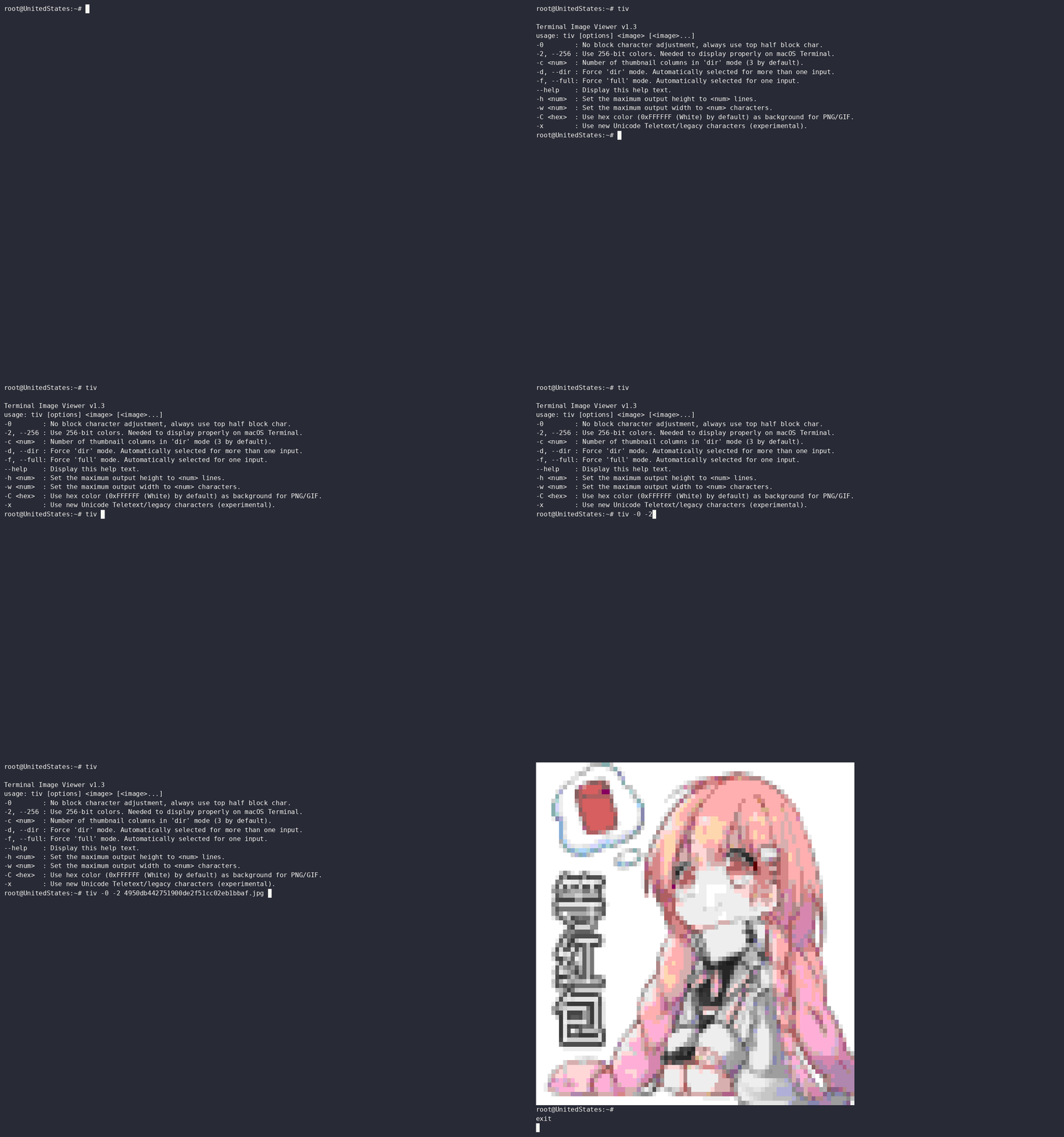
在 Xshell 软件下直接使用时发现显示的效果一塌糊涂,需要加上-2、-256或者--256参数使用 256-bit 色彩才较为清晰,不过在使用 Windows 10 的终端浏览时不加参数也是较为清晰的。
其中经过测试发现,在 Xshell 软件中将字体调至 1 号大小,这样出来的图更为精细,当然清晰度肯定是不能与原图相比的!
附上:
root@ChiuYut-VM:~# tiv

Terminal Image Viewer v1.3
usage: tiv [options] <image> [<image>...]
-0        : No block character adjustment, always use top half block char.
-2, --256 : Use 256-bit colors. Needed to display properly on macOS Terminal.
-c <num>  : Number of thumbnail columns in 'dir' mode (3 by default).
-d, --dir : Force 'dir' mode. Automatically selected for more than one input.
-f, --full: Force 'full' mode. Automatically selected for one input.
--help    : Display this help text.
-h <num>  : Set the maximum output height to <num> lines.
-w <num>  : Set the maximum output width to <num> characters.
-C <hex>  : Use hex color (0xFFFFFF (White) by default) as background for PNG/GIF.
-x        : Use new Unicode Teletext/legacy characters (experimental).
tiv浏览图片:
参考
- Small C++ program to display images in a (modern) terminal using RGB ANSI codes and unicode block graphics characters
https://github.com/stefanhaustein/TerminalImageViewer
ChiuYut
2026年05月08日